
The Challenge
Modernizing Legacy Chrome Apps While Preserving Critical Enterprise Capabilities
As organizations move beyond legacy Chrome Apps, applications built on the older Chrome App platform need a modern approach that preserves the capabilities businesses already depend on. Codimite worked with an enterprise software provider whose established ChromeOS application supported complex printing, device communication, network connectivity, and enterprise workflows. With the legacy Chrome App technology approaching the end of its supported lifecycle, the organization needed a Chrome App migration strategy that could modernize the application without compromising its existing business-critical capabilities.
The challenge was to:
- Migrate from the legacy Chrome App architecture to modern ChromeOS technologies.
- Preserve complex enterprise workflows throughout the migration.
- Maintain device and network capabilities required by the existing application.
- Modernize the user experience without disrupting familiar business processes.
- Support managed ChromeOS deployment across enterprise environments.
- Create a scalable foundation for future product development.
This was not a simple web application migration. The existing Chrome App relied on capabilities spanning user experience, device communication, networking, printing, and ChromeOS integration. Moving everything directly into a conventional web application or Chrome Extension would not provide an equivalent replacement. The project therefore required a carefully designed Chrome App to IWA migration strategy.
Codimite's Solution
Re-engineering Enterprise Printing with Isolated Web Apps
Codimite re-engineered the legacy Chrome App using Isolated Web App (IWA) and modern ChromeOS technologies. Rather than performing a direct one-to-one application rewrite, the team assessed the existing Chrome App capabilities and determined how each workflow could be delivered within the modern ChromeOS ecosystem. The modernization focused on building an IWA-based application experience that could support the next generation of the product while preserving the critical integrations required by enterprise workflows. This included modernizing the user interface, re-engineering device and network interactions, and establishing secure communication between application components where different ChromeOS capabilities were required.
A key consideration was the application's dependency on ChromeOS-specific functionality. Enterprise printing solutions frequently require deeper interactions with devices, networking capabilities, and operating-system services than conventional web applications. Codimite's approach considered these dependencies individually to identify how existing functionality could be supported within the modern application environment.
A Migration Strategy Designed Around Existing Capabilities
Complex Chrome Apps often rely on functionality that cannot simply be recreated inside a standard web application. For this reason, Codimite approached the migration by first understanding the application's existing capabilities and then mapping them to the appropriate modern ChromeOS technologies.
The implementation focused on:
- IWA-based modernization: Building a modern application experience around Isolated Web App technology.
- ChromeOS integration: Preserving essential platform capabilities required for existing enterprise workflows.
- Device and network communication: Re-engineering interactions to support printing, connectivity, and device-related requirements.
- Modern UI/UX: Improving the application experience while maintaining familiar user journeys.
- Secure component communication: Supporting interactions between application components where different ChromeOS capabilities were necessary.
- Managed deployment readiness: Establishing a foundation for controlled application distribution across enterprise ChromeOS environments.
Technical Architecture: Chrome App to IWA Modernization
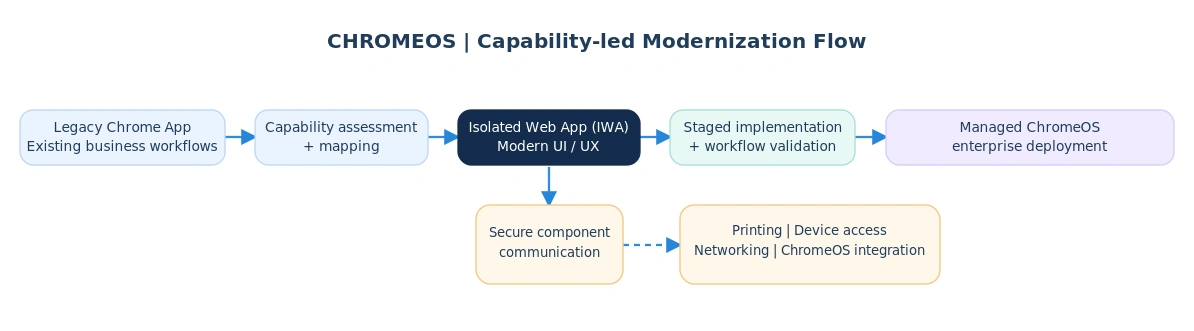
The modernization architecture centered on an IWA-based application experience, supported by the ChromeOS capabilities required for enterprise printing, networking, and device interactions. The transition began with an assessment of existing application features and their technical dependencies. These capabilities were then mapped to appropriate modern ChromeOS technologies to support a structured migration. A staged implementation and validation approach was used to progressively migrate and verify critical workflows. This process enabled the team to review the behavior of essential business functions throughout modernization rather than relying on a single application replacement step. By combining capability assessment, architecture planning, progressive implementation, and structured validation, Codimite established a migration approach designed to reduce risk while preserving the functionality that enterprise users relied on.
Business Impact
A Future-Ready Foundation for Enterprise ChromeOS Applications
The engagement established a future-ready modernization path for a complex enterprise Chrome App, demonstrating how applications with deeper ChromeOS dependencies can transition toward modern technologies such as IWA.
Key outcomes included:
- Modern Application Architecture: A modern ChromeOS application architecture designed to replace the legacy Chrome App foundation.
- Successful Workflow Migration: Successful migration of core enterprise workflows into the new application environment.
- Improved User Experience: A modernized user experience designed for the next generation of the product.
- Preserved Business Capabilities: Preservation of critical device, network, and business capabilities during modernization.
- Reduced Migration Risk: Reduced Chrome App migration risk through capability assessment, staged implementation, and structured validation.
- Enterprise Deployment Readiness: A foundation for managed enterprise deployment across ChromeOS environments.
- Long-Term Scalability: A scalable architecture that supports continued product evolution beyond the legacy Chrome App platform.
Most importantly, the project demonstrated that complex Chrome App migrations do not have to mean sacrificing the capabilities of the original application. With the right architecture and migration strategy, enterprise Chrome Apps with advanced device, network, and platform integrations can be modernized for the future of ChromeOS.


