Island Browser Pricing: What It Actually Costs
Introduction
If you visit Island’s website looking for a pricing page, you won’t find one. Like many enterprise security vendors, Island gates its pricing behind custom sales quotes and discovery calls.
However, between public AWS Marketplace listings, UK public-sector reseller schedules, and IT administrator disclosures on Reddit, enough verified pricing data exists to map out what an Island deployment actually costs and why the gap between Island and Chrome Enterprise Premium (CEP) catches many CFOs off guard.
What Island Browser Actually Costs (Publicly Reported Figures)
While exact enterprise quotes vary based on contract length and volume discounts, publicly documented pricing signals consistently point to a high entry threshold:
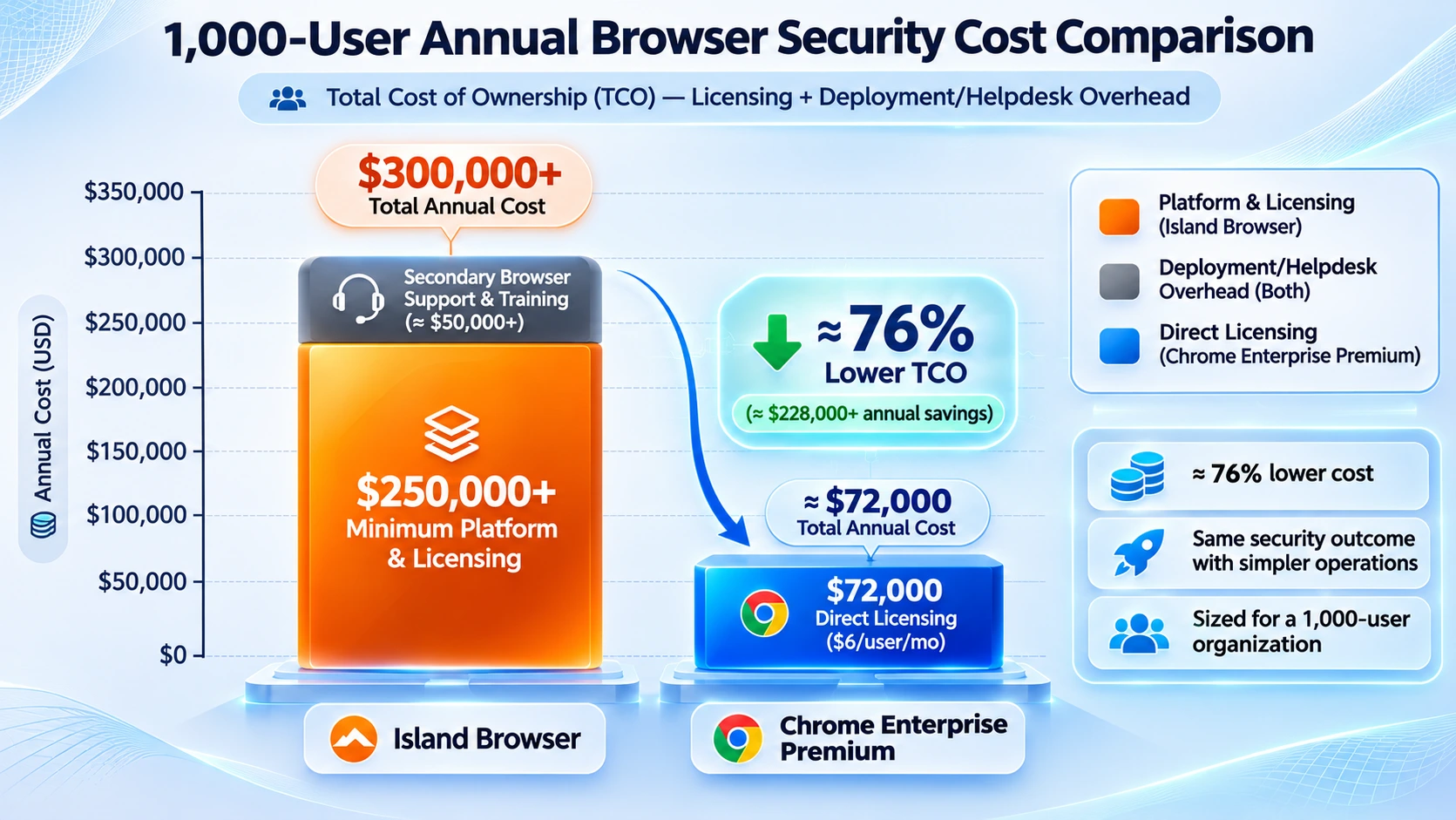
- Minimum Annual Spend: Both AWS Marketplace listings and sysadmin disclosures cite a $250,000 minimum annual commitment for a one-year subscription.
- Platform + Per-User Structure: Public reseller schedules break Island’s list pricing down into a $250,000 annual base platform fee for the management console, plus roughly $200 per user per year (around $16.67/user/month) before volume negotiations.
- MSP / Usage-Based Tiers: Third-party marketplace analyses note that metered usage add-ons and MSP-bundled per-user tiers can push effective monthly costs significantly higher for smaller cohorts.
By contrast, Google publishes its pricing openly: Chrome Enterprise Core is $0, and Chrome Enterprise Premium lists at $6 per user per month ($72 per user per year). (Note: Partner-led CEP contracts typically carry a modest $14,000 minimum Total Contract Value, a fraction of Island’s entry floor.)
What Drives the Total Cost Gap?
Licensing fees are only half of the financial equation. When IT teams deploy a secondary browser alongside Chrome, three hidden operational multipliers inflate Total Cost of Ownership (TCO):
- Duplicate Administration Overhead: Because internal web apps and legacy extensions often break on a new browser, IT ends up maintaining policies across two browsers, Island for selected SaaS apps and Chrome for everything else.
- Helpdesk Ticket Spikes: Every browser update, broken SSO redirect, or blocked copy/paste workflow generates Tier-1 and Tier-2 support tickets. For a 1,000-user organization, avoiding deployment and helpdesk overhead accounts for roughly $40,000 per year in saved engineering hours.
- Onboarding & Change Management: Retraining clinical, finance, or operations teams to change how they download, print, and share files creates measurable productivity drag during the first 6 to 12 months.
Side-by-Side Comparison: Island Browser vs. Chrome Enterprise Premium
| Evaluation Metric | Island Browser | Google Chrome Enterprise Premium (CEP) |
|---|---|---|
| Published List Price | Quote-gated (~$250,000/yr minimum + per-user fees) | $6 / user / month ($72/user/yr; Core tier is $0) |
| 1,000-User Annual Licensing | ~$250,000 – $450,000+ (before discounts) | $72,000 / year (at standard list price) |
| Browser Architecture | Separate Chromium-based browser application | Native Google Chrome (already installed on endpoints) |
| App & Extension Compatibility | Requires testing; occasional rendering & MDM quirks | 100% native compatibility with all web apps & extensions |
| DLP & Context-Aware Access | Built-in granular controls & session recording | Native in-line DLP, OCR, malware scanning & BeyondCorp CAA |
| Best Fit Use Case | Unmanaged BYOD contractors & forensic session recording | Enterprise-wide Zero Trust & DLP across managed fleets |
Frequently Asked Questions (FAQ)
How much does Island Browser cost per user?
Island does not publish public per-user pricing. However, public reseller price lists cite a $250,000 annual base fee for the management console plus $200 per user per year (~$16.67/month) before enterprise volume discounts, with AWS Marketplace contracts also starting at $250,000 annually.
Why is Chrome Enterprise Premium so much cheaper than Island?
Chrome Enterprise Premium runs directly on top of the Google Chrome browser already installed on your endpoints. Because Google builds and maintains the underlying Chromium engine and cloud management infrastructure, there is no separate browser client to package, update, or license at a standalone platform markup.
Can we keep Island for contractors and use CEP for everyone else?
Yes. Many organizations adopt a hybrid model: they use Island strictly for the 10–15% of external contractors requiring forensic screen recording or unmanaged BYOD isolation, while deploying Chrome Enterprise Premium across their full-time workforce to save six figures annually.
Wanna Plan Your Transition?
Ready to evaluate a controlled transition off Island before your next renewal? Explore Codimite’s Island to Chrome Enterprise Premium Migration Service to see how we assess, map, and migrate your existing security controls to Chrome Enterprise Premium.